Why ClickUp Runs Our Business Day-to-Day (And Replaced 5+ Business Tools)
Why ClickUp Runs Our Business Day-to-Day (And Replaced 5+ Business Tools)
If you run a service-based business, coaching company, virtual assistant agency, or online business, you already know how overwhelming managing multiple systems can become.
One platform for project management.
Another for time tracking.
Another for SOPs.
Another for meeting notes.
Another for screen recordings.
Another for communication.
Before long, you are juggling subscriptions, disconnected workflows, scattered information, and operational chaos.
That is exactly why we started using ClickUp for business management.
Today, ClickUp runs almost every part of our business day-to-day.
From client delivery and team communication to workflows, automations, SOPs, dashboards, and onboarding systems — ClickUp has become the operational backbone of our company.
And honestly?
It replaced many of the tools we were paying for separately.
Why We Needed a Better Business Management System
As our business grew, our systems became more complicated.
We were managing:
coaching programs
virtual assistant services
social media management
client onboarding
recurring operations
sales systems
content workflows
team communication
reporting and KPIs
The biggest problem was not the workload.
It was the fragmentation.
Information lived everywhere:
Google Docs
spreadsheets
Slack messages
separate apps
random Loom links
disconnected project boards
The result?
things got missed
onboarding became inconsistent
team communication became reactive
client delivery slowed down
accountability was unclear
scaling felt harder than it should
We needed one central operational platform.
That is when ClickUp for business completely changed how we operated.
What Makes ClickUp Different?
There are plenty of project management tools available:
Asana
Trello
Monday.com
Notion
But what stood out with ClickUp was how flexible and customisable it was.
Instead of forcing our business into rigid systems, ClickUp allowed us to build workflows around how our business actually operates.
That flexibility matters enormously for growing service-based businesses.
Especially businesses managing:
clients
teams
recurring work
content creation
onboarding
operations
approvals
reporting
ClickUp became far more than just a task management platform.
It became a complete business operating system.
Business Tools ClickUp Replaced For Us
ClickUp Replaced Loom
We previously used Loom daily for:
SOP walkthroughs
onboarding tutorials
client feedback
internal training
process documentation
Now we use ClickUp Clips directly inside tasks.
This means:
videos stay attached to workflows
feedback stays contextual
onboarding is easier
training is centralised
communication is streamlined
Having video communication directly inside our project management system saves a huge amount of time.
ClickUp Replaced Clockify
We used to rely on Clockify for time tracking.
Now our team tracks time directly inside ClickUp tasks.
This gives us:
improved profitability visibility
cleaner reporting
easier payroll tracking
better workload management
stronger capacity planning
Integrated time tracking inside ClickUp removed unnecessary admin and double handling.
ClickUp Replaced Otter.ai
We previously used Otter.ai for transcripts and meeting notes.
Now we manage:
meeting summaries
workshop notes
action items
SOP updates
planning sessions
inside ClickUp Docs using ClickUp AI.
The biggest advantage is operational integration.
Notes do not just sit inside another platform.
They become actionable tasks, workflows, systems, and documented processes.
How We Use ClickUp in Our Business
ClickUp for Client Delivery
We use ClickUp to manage:
onboarding
client communication
deliverables
recurring tasks
approvals
deadlines
team collaboration
Every client workflow is templated and repeatable.
This improves consistency and reduces missed tasks.
ClickUp for Social Media Management
Our content workflows inside ClickUp include:
strategy
caption writing
graphics
approvals
revisions
scheduling
reporting
Everything is visible in one place.
This has dramatically improved efficiency across our content delivery process.
ClickUp for SOPs and Team Training
Instead of storing SOPs in scattered Google Docs, we now use:
ClickUp Docs
ClickUp Clips
ClickUp templates
This allows us to create:
onboarding systems
training libraries
process documentation
operational workflows
repeatable systems
For growing teams, this is incredibly valuable.
ClickUp for CEO Dashboards and KPIs
One of the biggest advantages of ClickUp for business owners is visibility.
We use dashboards to track:
revenue
sales activity
content production
lead generation
client delivery
team capacity
operational bottlenecks
As a CEO, having operational visibility improves decision-making significantly.
Why ClickUp Works So Well for Service-Based Businesses
ClickUp works particularly well for:
virtual assistants
online business managers
agencies
coaches
consultants
freelancers
social media managers
service providers
As businesses grow, operational complexity increases.
Without systems:
communication breaks down
delegation becomes difficult
tasks get missed
team accountability suffers
burnout increases
scaling becomes chaotic
ClickUp helped us centralise operations and reduce unnecessary complexity.
The Biggest Benefit Was Reduced Mental Load
The biggest transformation was not productivity.
It was clarity.
Instead of trying to remember everything:
tasks are documented
workflows are visible
priorities are clear
systems are repeatable
accountability improves naturally
onboarding becomes easier
ClickUp gave us more CEO space.
And for business owners, that matters enormously.
Our Most Used ClickUp Features
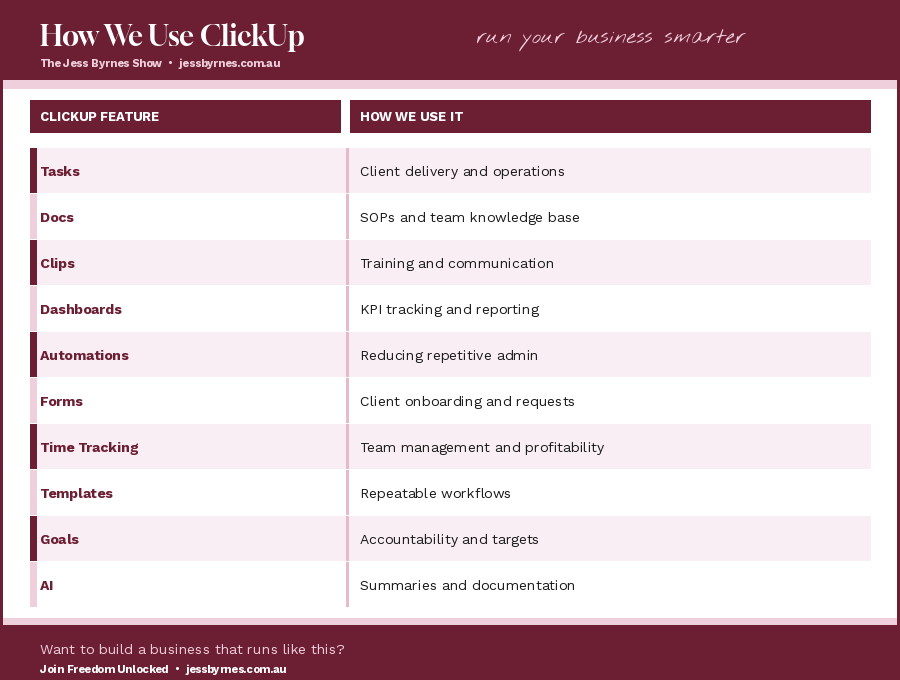
Is ClickUp Worth It for Business?
For our business, absolutely.
But the key is implementation.
Like any powerful platform, ClickUp can become overwhelming if there is no structure.
The goal is not to build complicated systems.
The goal is to create operational simplicity.
When implemented properly, ClickUp helps businesses:
streamline operations
improve visibility
reduce admin
delegate effectively
standardise workflows
scale sustainably
Final Thoughts on Using ClickUp for Business
We did not choose ClickUp because it was trendy.
We chose it because we needed:
stronger systems
operational visibility
scalable workflows
better delegation
streamlined communication
reduced mental load
improved accountability
Over time, ClickUp became far more than a project management tool.
It became the system that runs our business day-to-day.
For growing online businesses, that shift is incredibly powerful.
Frequently Asked Questions About ClickUp
Is ClickUp good for small businesses?
Yes. ClickUp works extremely well for small businesses and service providers needing project management, workflows, SOPs, onboarding systems, and team collaboration.
Can ClickUp replace multiple tools?
Absolutely. We replaced several platforms including Loom, Clockify, and Otter by using ClickUp features instead.
Is ClickUp difficult to learn?
There is a learning curve initially, but once systems are set up properly, ClickUp becomes significantly easier to manage.
What businesses should use ClickUp?
ClickUp works particularly well for:
virtual assistants
agencies
coaches
consultants
freelancers
operations teams
online service businesses
Need Help Setting Up ClickUp for Your Business?
At Jessica & Co Aust, we help service-based businesses create scalable systems, streamline operations, improve workflows, and build operational visibility using ClickUp, CRM automation, and business systems.
Whether you need:
workflow setup
onboarding systems
SOP organisation
team dashboards
ClickUp automation
operational consulting
We can help simplify and structure your business operations. Contact us at https://jessbyrnes.com/about
